Running a SaaS product without good event tracking tools is like flying a plane with half the instruments turned off. You see signups, logins, or churn numbers move, but you cannot tell which clicks, forms, or features caused the change. Event tracking fills in that missing detail, so you can see how real people move through your website and app.
Event tracking means recording user actions as events, such as:
- Page views
- Button clicks
- Form submissions
- Feature activations
- Purchases and upgrades
With a good event tracking system, every action becomes a data point that explains behavior.
When you combine thousands or millions of these events, an event analytics platform shows which features people use, where they get stuck, and which steps lead to long-term customers.
W. Edwards Deming once said, “Without data, you’re just another person with an opinion.”
At the same time, privacy laws like GDPR and CCPA, plus browser tracking limits, make older analytics approaches harder to use safely.
Many teams feel caught between:
- Risky tools that rely heavily on cookies
- Expensive enterprise products that demand long contracts
- Separate tools for marketing pages and in-app usage that never quite line up
This guide walks through six of the best event tracking tools for SaaS and websites.
The list includes heavyweight product analytics tools, powerful auto-capture tools, and privacy-focused event-monitoring platforms.
Vemetric comes first because it combines web and product analytics into a single open-source, GDPR-compliant platform with cookie-free tracking.
By the end, you will know how each event monitoring tool handles:
- Tracking events
- Privacy and compliance
- Implementation effort
- Pricing and typical use cases
That makes it easier to pick the right fit for your stack, your compliance needs, and your budget, whether you run a lean startup or a growing SaaS company.
What is Event Tracking? Importance and Examples
Event tracking records specific user actions rather than focusing only on page views.
An event can be:
- A click on the Start Trial button
- A signup form submission
- Toggling a feature on or off
- A plan upgrade or downgrade
- A failed or successful payment
These event tracking examples show that every meaningful interaction can become an event in your data.
Traditional web analytics tools focus on pages and sessions. They answer questions like:
- Which pages get the most traffic?
- Which sources send the most visits?
Event-based tools track individual actions inside your product so that you can see:
- Which features people actually use
- How users move across screens
- Which steps correlate with retention and revenue
For SaaS, that kind of event-level insight is far more helpful than simple page counts.
When you link marketing events on your website with product events inside your app, you see a complete user path from first visit to power user.
You can:
- Measure activation
- Find drop-off points in onboarding
- Track which actions reduce churn
That view is essential when you decide which features to build, which channels to invest in, and where to improve onboarding.
Most event tracking tools support two main methods of tracking:
- Autocapture: Records common interactions, such as clicks and page views, with minimal setup.
- Manual implementation: Your developers send custom events that match your business logic.
You often need both methods, especially for key events such as Started Trial or Completed Onboarding.
Privacy now sits at the center of all this.
Cookie-free tracking, clear data retention rules, and GDPR-compliant storage are no longer optional.
Many teams feel frustrated with:
- Scattered data across multiple tools
- Constant worries about consent banners and fines
The tools below address these problems in different ways, with Vemetric focusing primarily on privacy-first analytics for SaaS.
Vemetric
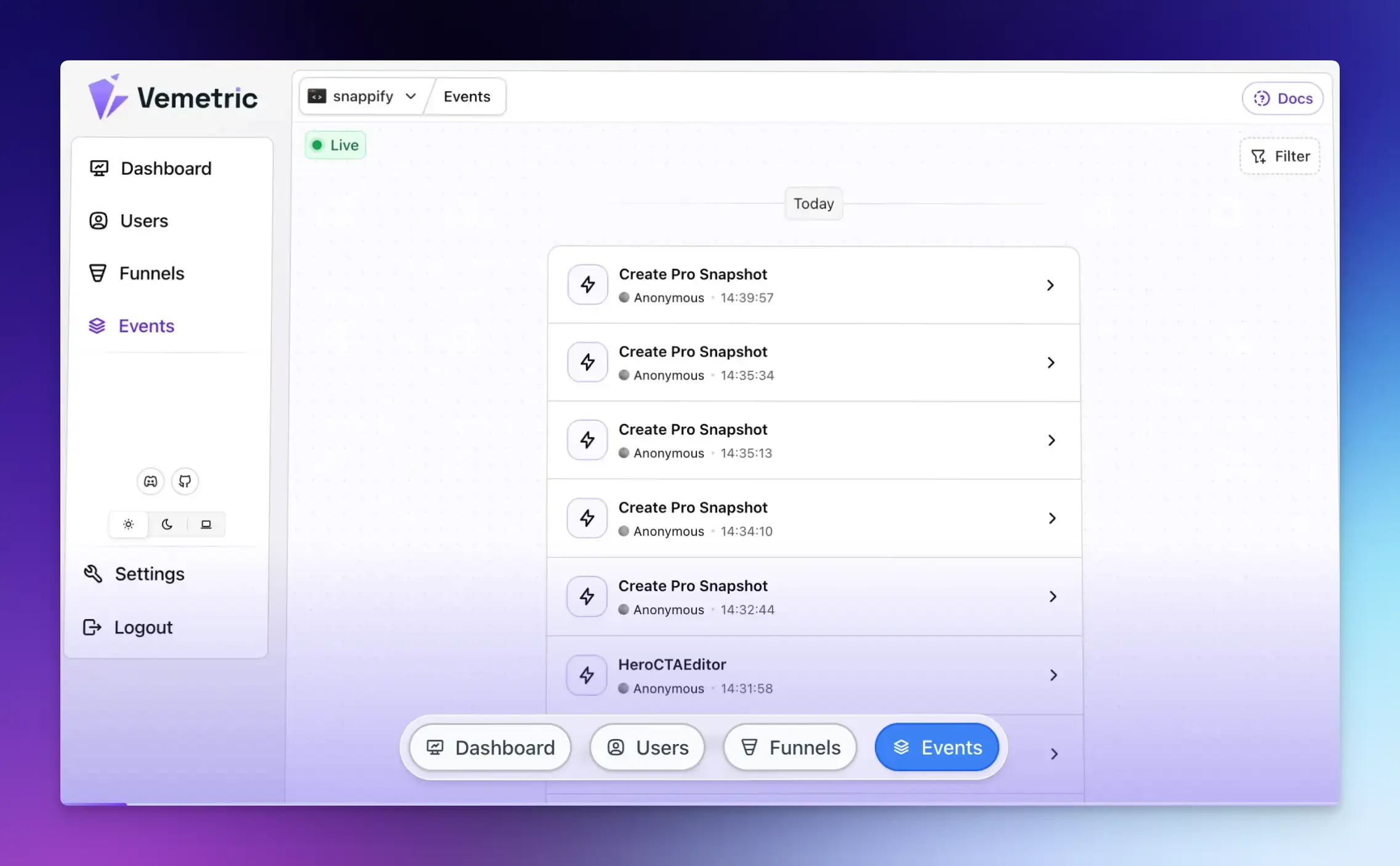
Vemetric gives you unified tracking for your marketing site, web app, and other touchpoints. You can track events such as page views, signups, feature clicks, and billing actions in one place, rather than stitching data across multiple event-tracking tools.
Key Features:
- Cookie-free tracking: So data collection still works when browsers block third-party cookies, and you reduce many consent headaches
- Open-source codebase: You can inspect how data flows, what is stored, and how it is processed
- Developer-friendly SDKs: For common frameworks, making it easier to send events from both client and server code
- Real-time dashboards: For funnels, segments, and retention analysis
- EU-based hosting: For teams that need strict data residency
Pricing:
- Free plan includes 2,500 events per month.
- Paid plan starts at $5 per month (10,000 events).
- Custom enterprise pricing available for higher volumes (5000k+ events)
Amplitude
Amplitude is one of the most established event tracking tools for product analytics. It fits teams that want very detailed behavioral data, complex reports, and advanced cohort analysis across large user bases.
It supports both limited autocapture on certain platforms and precise event tracking through a wide range of SDKs.
That makes it possible to send data from web, mobile, and backend services into one event monitoring tool.
Once events flow in, you can:
- Build funnels and retention curves
- Create custom user paths that show how different groups behave over time
- Follow the impact of new feature launches in near real time
Segmentation is a major strength in Amplitude.
You can group users by:
- Events and event properties
- Device types and platforms
- Custom traits such as plan tier or region
The platform supports both client-side and server-side events, which helps you track sensitive actions like payments from secure backends.
For large SaaS products, this level of detail helps you test hypotheses and focus on the features that lead to retention and revenue.
Amplitude works best when your team has strong data skills and wants very granular product insight:
- A generous free tier for up to 50,000 Monthly Tracked Users, which covers many early-stage products
- Governance features, permissions, and integrations with data warehouses and other analytics tools
- Advanced reporting for teams that run many experiments and want fine-grained cohort comparison
Privacy controls exist, but they are not the main focus compared with a privacy-first product like Vemetric.
Pricing:
- Free plan that covers up to 50,000 Monthly Tracked Users
- Plus plan starting around $49 per month, scaling based on usage and features
- Custom pricing for larger organizations
Mixpanel
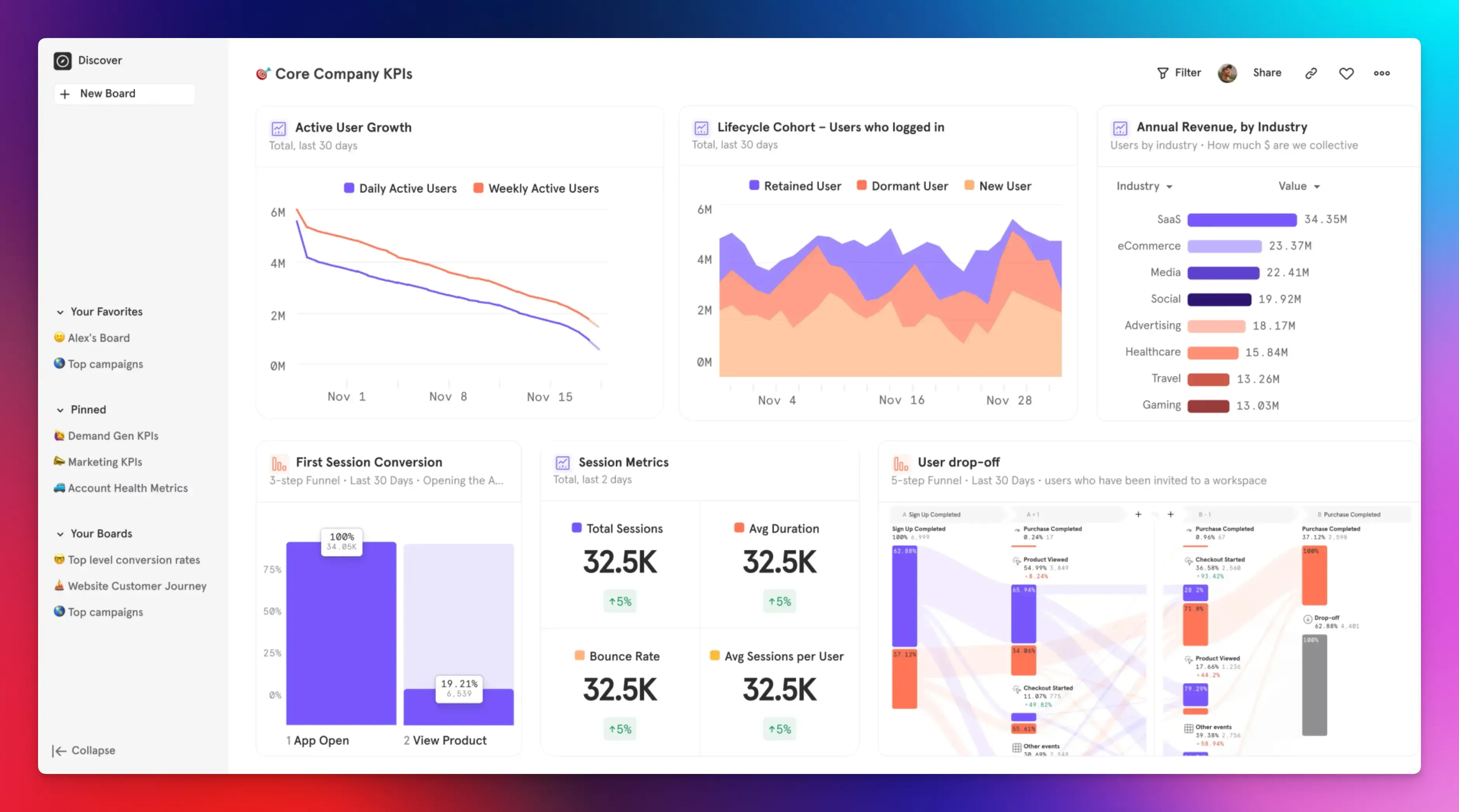
Mixpanel aims to give you strong product analytics without requiring a full data team. It is one of the more approachable event tracking tools for SaaS, with a focus on fast, self-serve reporting.
It supports:
- Client-side tracking through web and mobile SDKs
- Server-side events for critical flows like billing and account changes
- Autocapture for basic web interactions, plus manual events for actions that matter most
The interface is clean and designed so product managers and marketers can build:
- Funnels
- Path reports
- Retention views
All without writing SQL.
Session replays add qualitative context by letting you watch how users move through screens before they drop off. Mixpanel also integrates with popular CDPs, making it easier to feed data from other tools into your event analytics platform.
Mixpanel fits teams that want useful event tracking without deep learning curves:
- Reports load quickly and feel responsive
- Pre-built templates answer common product questions
- Non-technical teammates can explore data on their own
Pricing:
- A free plan with up to one million events per month
- Paid plans starting around $0 for 1M monthly events and $0.28 per 1k events.
Heap
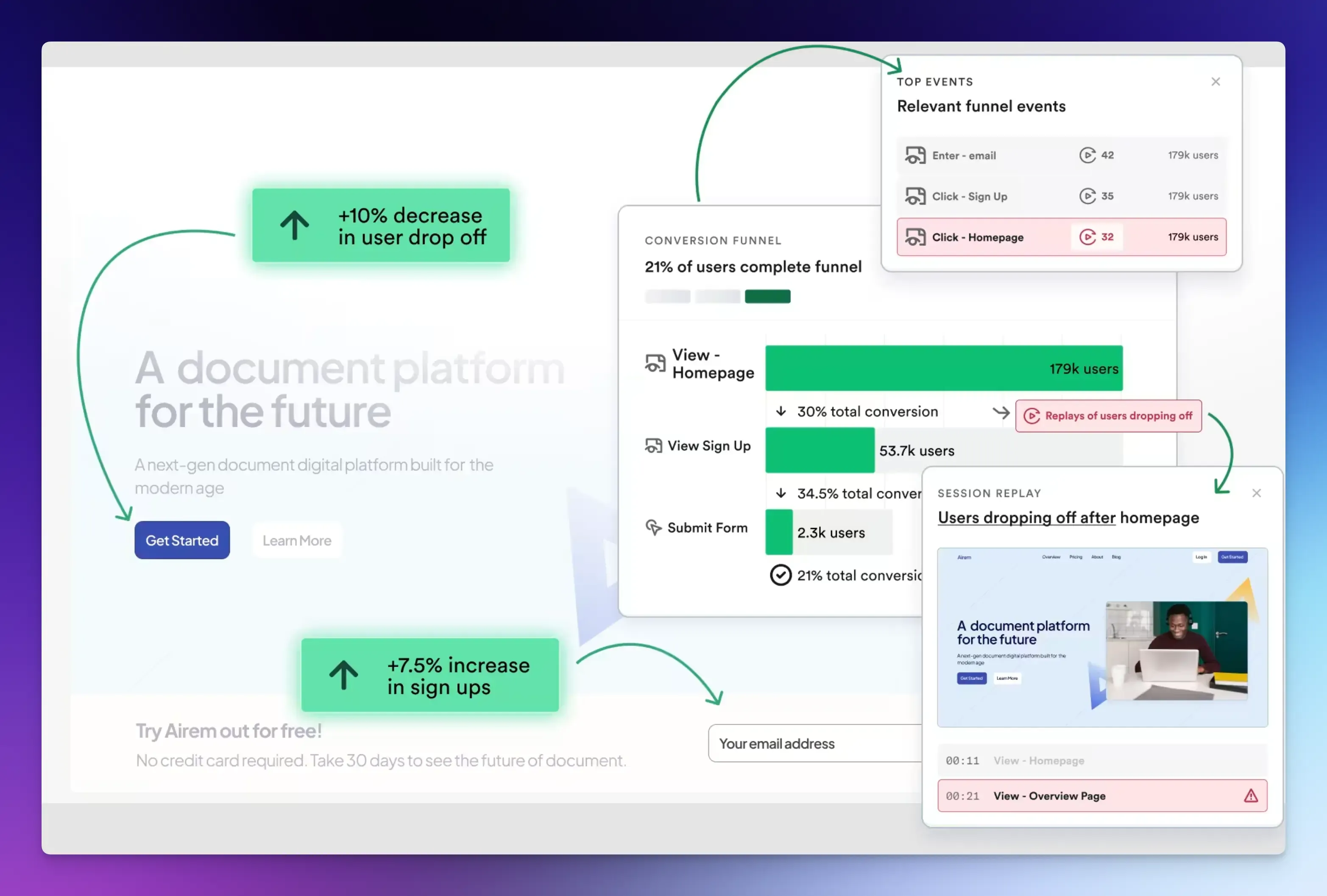
Heap is an event-tracking system that records almost everything by default. It centers on autocapture, so you spend less time deciding which events to track up front and more time exploring behavior after the fact.
Once installed, Heap automatically records:
- Clicks
- Page views
- Form interactions
- Other common web and mobile behaviors
The key idea is that you can define events later using data already stored, which means you do not miss important behavior just because no one requested tracking earlier. This retroactive **analysis sets Heap apart from many other event tracking tools.
Heap also includes:
- Session replays
- Funnel analysis
- User path mapping
If you need to track server-side events such as payments or background jobs, you can still send manual events from your backend.
Segmentation runs across the full event history, giving you a wide view of how different user groups behave over long periods.
Heap works well when you want deep behavioral data but do not have the time or internal process to design a perfect tracking plan. With Heap, you can:
- Start recording events quickly
- Create event definitions, funnels, and segments later as new questions appear
- Reduce the “I wish we had tracked that last month” problem
That flexibility is especially useful for startups that change products quickly and often discover new questions after features ship.
Pricing:
- A free tier that covers up to 10,000 sessions per month
- Custom-priced larger plans based on session volume and feature needs
PostHog
PostHog is an open-source event analytics platform that combines product analytics with feature flags, A/B testing, and session replay. It appeals strongly to engineering-led teams that want control and flexibility.
PostHog uses an event-based model and can track activity across web, mobile, and backend systems through SDKs or a simple HTTP API. It supports:
- Autocapture for front-end interactions
- Manual events when you need clear definitions tied to business logic
On top of this event data, PostHog provides:
- Dashboards
- Funnels
- Cohorts
- Retention analysis
A big plus is that PostHog bundles session replay, feature flags, and experiments into a single platform.
That means you can:
- Release features to small segments
- Track how those features affect behavior
- Watch real user sessions in one place
Warehouse-native options and open-source code give you strong control over how data is stored and processed, especially if you self-host.
Pick PostHog if you want an all-in-one event monitoring tool that stays under your control:
- Self-hosting gives you complete data ownership.
- The open-source license avoids the feel of a closed vendor.
- Built-in experimentation features reduce the number of separate tools you need to manage.
Pricing:
- A free tier covering up to one million events per month
- Paid plans for higher volumes, managed hosting, and advanced features (Pay-as-you-go)
Google Analytics 4 (GA4)
Google Analytics 4 (GA4) is the standard free option for website analytics and a common starting point for many teams. It uses an event-based model but focuses more on web traffic and marketing performance than deep product usage.
GA4 tracks website and app activity using events rather than the older session model in Universal Analytics. With Google Tag Manager, marketers can set up many events without writing code, making basic event tracking accessible to non-developers.
You can:
- See real-time reports for visitors currently on your site
- Track which pages they view and which traffic sources brought them
- Build standard reports for acquisition, engagement, and conversions
Custom dashboards let you highlight metrics that matter most to your business.
Pricing:
- The standard GA4 product is free for most businesses and supports high traffic volumes at no direct cost
- An enterprise version named Analytics 360 is available for very large organizations that need advanced features and service-level agreements.
Final Words
Picking the right event tracking tools depends on what matters most for your product and team.
Privacy-first analytics and a single view across web and app often point you toward Vemetric, especially if you care deeply about data protection.
If you need highly technical, data-heavy analysis, Amplitude or Mixpanel may appeal more, while Heap’s autocapture suits teams that worry about missing data. PostHog is attractive when you want open-source control and built-in experiments, and GA4 remains a solid free option for website traffic.
FAQs
Web analytics focuses on what happens on your public website. It tracks traffic sources, page views, bounce rate, and conversions such as form submissions or purchases. Product analytics looks at behavior inside your application after someone signs up, such as:
- Feature usage
- Onboarding completion
- Long-term retention
It can, but modern tools are optimized to minimize impact. For example, many load-tracking scripts run asynchronously and send event data in the background.
It depends on your requirements, but ideally you could use one tool that combines both worlds, in order to simplify your analytics stack and reduce overhead.