---
title: "Cloudflare | Using a proxy | Documentation - Vemetric"
description: "Optimize tracking by proxying data via Cloudflare."
url: https://vemetric.com/docs/advanced-guides/using-a-proxy/cloudflare
---
# Setting up a proxy using Cloudflare
Optimize tracking by proxying data via Cloudflare.
* * *
With Cloudflare Workers, you can easily proxy the traffic through your own domain. We’ve prepared the following step-by-step guide to help you set it up.
## Setup
### Create the Cloudflare Worker
Navigate to the **Compute (Workers)** > **Workers & Pages** section in the Cloudflare dashboard and click on `Create`. Choose the “Hello World” template and deploy it.
> If you choose to rename the worker, we recommend avoiding names like `analytics` or `tracking`, as this might lead to Cloudflare taking them down.
Once the worker is created, click on `Edit Code` and paste the following code.
```js
addEventListener('fetch', event => {
event.respondWith(handleRequest(event.request))
});
const scriptUrl = 'https://cdn.vemetric.com/main.js'
const hubUrl = 'https://hub.vemetric.com'
const robotsTag = 'noindex, nofollow'
async function withRobotsHeader(responsePromise) {
const response = await responsePromise;
const newResponse = new Response(response.body, response);
newResponse.headers.set('X-Robots-Tag', robotsTag);
return newResponse;
}
async function handleRequest(request) {
const url = new URL(request.url)
if (url.pathname === '/main.js') {
return await withRobotsHeader(fetch(scriptUrl));
} else {
const newRequest = new Request(hubUrl + url.pathname, request);
newRequest.headers.set('x-country', request.headers.get('cf-ipcountry'));
newRequest.headers.set('x-client-ip', request.headers.get('x-real-ip'));
return await withRobotsHeader(fetch(newRequest));
}
}
```
### Add the Worker Route
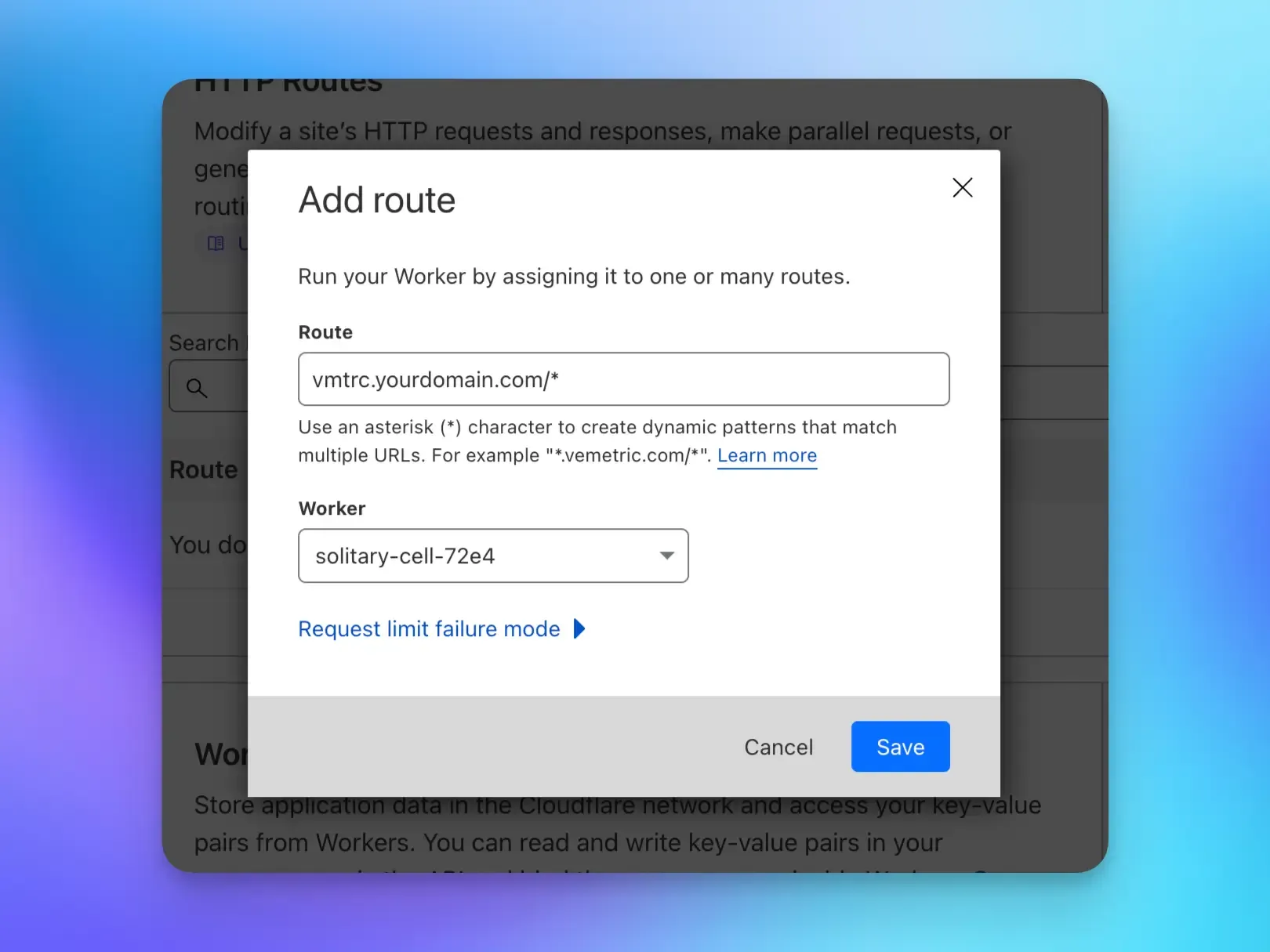
On your domain’s Dashboard, go to **Workers Routes** and add a new HTTP Route.
Set the Route to your desired domain including a wildcard path (e.g. `hub.yourdomain.com/*`) and choose the Worker you created in the previous step.
> We recommend avoiding names or paths like `analytics.yourdomain.com` or `yourdomain.com/track`, as this might also trigger ad/tracker blockers.
>
> Use more generic names like `hub.yourdomain.com` instead.
### Create the DNS Record
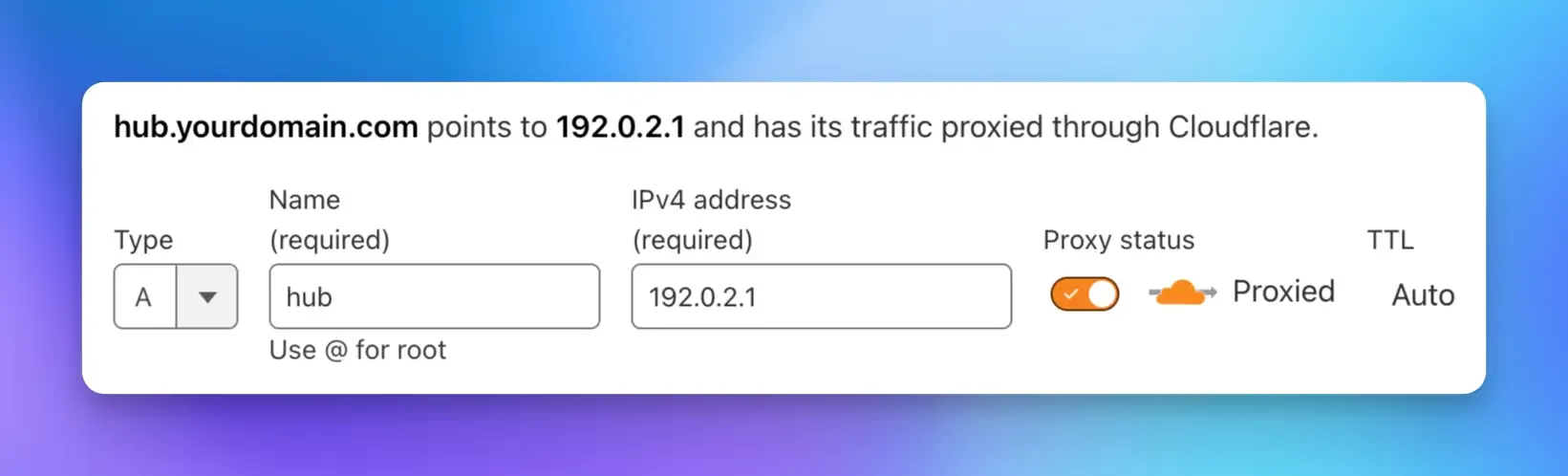
The last step on Cloudflare is to create a DNS record for your proxy domain. It should be a record of Type `A` and the Name should be your desired subdomain (e.g. `hub`). Set the Content to `192.0.2.1` and leave the Proxy status as `Proxied`.
### Configure Vemetric
Depending on your setup you need to adjust the Vemetric configuration:
**HTML**
The `src` attribute of the script tag should now point to `https://hub.yourdomain.com/main.js`. You also need to pass the `data-host` attribute with the value of `https://hub.yourdomain.com`
```html
```
**JavaScript**
For the JavaScript SDK, you need to pass the `scriptUrl` and `host` options to the `init` function with the value of your proxy domain.
```ts
import { vemetric } from '@vemetric/web';
vemetric.init({
token: 'YOUR_PROJECT_TOKEN',
scriptUrl: 'https://hub.yourdomain.com/main.js',
host: 'https://hub.yourdomain.com',
});
```
**React**
For the React SDK, you need to pass the `scriptUrl` and `host` props to the `VemetricScript` component with the value of your proxy domain.
```tsx
import { VemetricScript } from '@vemetric/react';
```
**Astro**
For the Astro SDK, you need to pass the `scriptUrl` and `host` props to the `VemetricScript` component with the value of your proxy domain.
```tsx
import { VemetricScript } from '@vemetric/astro';
```
Congratulations! You’ve successfully set up a proxy using Cloudflare Workers. Please reach out if you have any questions.